

Website Maintenance Is More Than WordPress Updates
If you pay somebody to maintain your website, what are they actually maintaining?
The question sounds simple, but the answer varies enormously.
Technical website maintenance is the ongoing work needed to keep a website’s software supported, its essential functions working, its security monitored and its backups usable. It also includes knowing who will respond when something goes wrong.
Website maintenance may mean changing words, uploading blogs, adding products or replacing photographs. It may mean applying WordPress and plugin updates. It may include security monitoring, server management, access control, backup testing and responsibility for responding when something goes wrong.
All of those services can honestly be called website maintenance, but they are not remotely the same service.
For a business owner, that distinction matters. A website can be fully updated in WordPress while still running unsupported server software (if you have heard the words “your PHP is out of date” this is for you), carrying abandoned plugins, failing to deliver enquiries or storing backups that cannot provide a clean recovery point.
Website maintenance should not be defined by a collection of buttons somebody clicks. It should be defined by whether the website remains supported, secure, recoverable and capable of delivering the business outcome it exists to provide.
Before we polish the bodywork
Business owners often ask for help because a website looks dated, its traffic has fallen or it no longer reflects the company properly. In motoring terms, they bring the vehicle in because the bodywork needs some TLC.
Before we polish the bodywork, however, we have to make sure the vehicle is not full of filler and rust.
An attractive redesign cannot make unsupported software safe. Better SEO cannot repair an unreliable checkout. New content cannot compensate for a compromised website. Polishing the surface without understanding the condition underneath may simply make an unhealthy website look more convincing.
There is a much less sophisticated phrase for that, but we will stick with the car analogy.
Although we still build new websites, much of our work now involves rescuing existing ones. We seem to have developed a reputation for resolving problems clients had no idea could exist, right up until one lands in the middle of their business and disrupts it.
Most of those owners have not deliberately neglected their websites. The site may remain in active use. New content may be added. WordPress and the visible plugins may be broadly up to date. Money may still be spent on SEO, advertising or design changes.
By the standard most owners have been taught to apply, the website appears maintained. It loads, it looks presentable and the dashboard is not necessarily displaying years of outstanding updates.
What the owner cannot see is the complete technical environment behind that dashboard.
Across website rescue projects, we find recurring problems such as:
- Outdated or unsupported PHP and other server software
- Plugins or themes abandoned by their developers
- Administrator accounts belonging to people who no longer require access
- Remote-access tools still connected long after their original purpose ended
- Malicious files hidden inside legitimate-looking folders
- Unexpected administrator accounts or changes made outside the normal dashboard
- Website files that appear clean while problems remain inside the database
- Multiple websites sharing an environment without adequate isolation
- Security alerts that never reached somebody responsible for acting on them
- Backups that are too recent, incomplete or untested to provide a reliable recovery point
- Forms, payment journeys or other essential functions that have stopped working without anybody noticing
These are not cosmetic imperfections. They are technical, commercial and sometimes business-continuity risks.
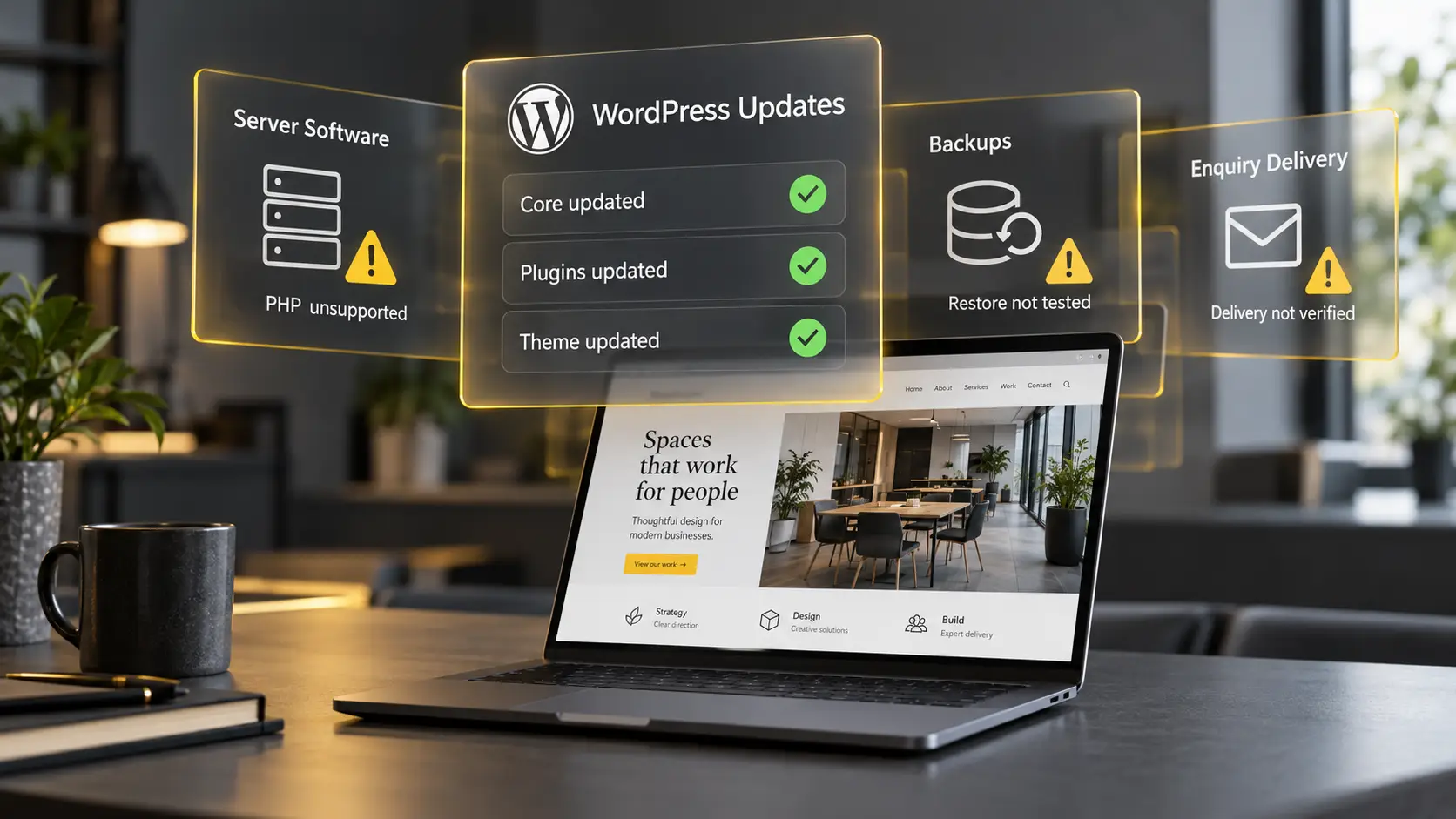
Why WordPress updates alone are not enough
One common example is PHP, the underlying software used by WordPress. Many business owners have never heard of it, let alone been told that its supported life needs to be monitored.
PHP 7.4, for example, has been unsupported since November 2022. Unsupported does not merely mean old or unfashionable. It means the software no longer receives the normal security support provided during its maintained life. If new vulnerabilities are discovered, the official fixes may never arrive.
Running unsupported software does not prove that a website has been compromised. It does create an avoidable and largely invisible risk.
The owner does not need to manage PHP personally, but they do need to know who is responsible for monitoring its supported life.
If you have ever been told that your website’s PHP is outdated or unsupported, you need to act. The work involved may feel expensive, particularly if an upgrade exposes compatibility problems elsewhere in an older website. But that cost should be compared with the cost of rebuilding the entire site, losing revenue while it is offline or managing the reputational consequences of a serious incident.
An upgrade should be planned, with a suitable backup and compatibility checks, ideally using a separate test version of the website before changes reach the live site. Afterwards, essential functions need to be tested to confirm that the website still works as the business and its customers expect.
The WordPress dashboard does not show the owner the whole vehicle. It shows them a handful of warning lights.
A website can be online and still be commercially broken
Not every technical failure announces itself with a security incident or a completely unavailable website.
Consider a contact form on an ordinary service website. The website is online and the form appears to work. Visitors can complete it, press Submit and receive a successful submission message, but the enquiries are no longer reaching the business.
The form may use a free plugin, which is not inherently a problem. However, if the plugin does not retain a record of submissions inside the website, there may be no second copy to recover when notification emails fail.
The cause can sit between two systems. An IT provider may legitimately strengthen the business’s email security, but messages generated by the website may then be blocked. The website continues accepting submissions while the business receives nothing.
The company notices fewer enquiries and understandably interprets that as a drop in demand. The leads may not have stopped. The route between the prospective customer and the business has failed, and the lost submissions may be impossible to recover.
Nobody needs to have been careless. The IT provider improved email security. The form remained visible. The website stayed online. The business monitored the number of enquiries it received.
What was missing was ownership of the complete journey from somebody pressing Submit to the message arriving in the correct inbox.
A successful message on a website does not prove that an enquiry reached the business.
What can happen in extreme circumstances?
Most technical problems do not become major security incidents. Many are found and corrected before obvious harm occurs.
In extreme circumstances, however, malicious code can remain hidden inside a website while it continues looking and functioning normally.
Ecommerce malware can imitate or interfere with a legitimate payment form. A customer may believe they are entering information into the normal checkout while that information is also being sent to an unauthorised third party.
Other malicious code may create hidden administrator access, steal login credentials, redirect visitors, add unwanted pages or use one compromised website as a route into a wider hosting environment.
The customer may see no obvious warning. The business owner may also remain unaware because orders, forms and pages can continue appearing to work.
When potentially harmful code is discovered, the answer is not necessarily to delete the file, change a password and put the website straight back online. Doing so may destroy evidence, obscure how access was obtained or make it harder to establish what else has been affected.
The immediate priorities may need to be containment, protection and preservation. Access may have to be restricted while the environment is investigated. Cybersecurity specialists, cybercrime reporting authorities, payment providers, the hosting company and legal advisers may all need to become involved.
The business must assess whether personal information may have been compromised and whether the incident meets the threshold for notifying the Information Commissioner’s Office. Where notification is required, it must be made without undue delay and, where feasible, within 72 hours of becoming aware of the personal data breach. A complete investigation does not have to be finished before an initial report is made; further information can follow as it becomes available.
If the breach is likely to result in a high risk to people’s rights and freedoms, affected individuals must also be informed without undue delay. These decisions need prompt attention alongside containment and recovery.
During that process, the website may be unavailable or severely restricted, preventing the business from generating enquiries, accepting orders or serving customers normally. Investigation and recovery take time away from running the company and can bring specialist technical costs, legal costs, disruption to connected services and damage to customer confidence.
Sometimes remediation is possible. Sometimes the environment can no longer be trusted and the website has to be rebuilt from a known clean foundation.
Taking a potentially unsafe website off the road is not a punishment for the business owner. It is a protective action for the business, the people who access the site and the members of the public who use it.
These are extreme circumstances, but they demonstrate why prevention, monitoring and clearly assigned technical responsibility matter before a warning becomes a crisis.

What should technical website maintenance include?
A comprehensive technical website maintenance service should cover supported software, security monitoring, access control, hosting health, essential function testing, tested backups and incident response. The scope should make clear who is responsible for each area.
The precise requirements will depend on the website. A small brochure site does not carry exactly the same risks as a busy ecommerce store, booking platform or membership system. However, a comprehensive technical maintenance service should normally address several core areas.
The appropriate checks and their frequency will depend on the website, but they should be planned, documented and repeated, not performed only when somebody remembers.
Supported software and compatibility
Somebody should know which versions of WordPress, PHP, themes, plugins, database software and server technology the website uses. They should identify when support is ending and plan updates or replacements before the site is left exposed.
Updates need to be applied appropriately, but clicking Update is only a task. Maintenance includes checking that the update completed successfully, resolving compatibility problems and confirming that the website still works afterwards.
Security and access
There should be suitable protection against malicious activity, monitoring for vulnerabilities and unexpected changes, control over administrator access and a clear response to warnings.
An automated alert is only useful if somebody receives it, reads it, understands it and is responsible for acting on it.
Hosting and server health
Somebody needs to understand what the hosting provider manages and what remains the website owner’s responsibility. Supported server software, SSL certificates, logs, errors, website isolation and access to the environment all matter.
Business-critical functionality
Forms, checkouts, booking systems, account registrations, password resets, order notifications and connected services need end-to-end testing.
Website maintenance should not merely confirm that a component exists. It should confirm that the business outcome still happens.
For a contact form, that means checking the complete journey from submission and retention through to delivery and response.
An uptime monitor can confirm that the website’s engine starts. It cannot necessarily tell you whether the brakes, lights and steering work.
Incident response
The business should know who will take control if something goes wrong. Who contains the incident? Who preserves evidence? Who investigates? Who contacts the relevant providers? Who advises on legal and reporting responsibilities? Who manages recovery?
The middle of an incident is a terrible time to discover that nobody owns the response.

A backup is only useful if it can be restored
We have encountered businesses that believed their websites were safely backed up, only to discover that they had just a few days of backups available.
That may be enough to recover a page accidentally deleted yesterday. It may be completely inadequate if malicious code has remained undetected for weeks or months, because every retained backup may already contain it.
A proper backup strategy should answer several questions.
How frequently are backups taken? How long are they retained? Are there several historical recovery points? Do they include both the website files and the database? Are copies kept separately from the live hosting environment? Could somebody who compromised the website also alter or delete them?
How quickly could the website be restored if something went wrong? How much recent information, such as orders, customer registrations or stored enquiries, could be lost between the last usable backup and the incident? The answers should reflect how much downtime and data loss the business can reasonably tolerate.
Most importantly, are those backups tested?
A successful backup notification confirms only that a backup process reported completion. It does not prove that the files are complete, the database is usable or the website can be restored.
Backups should be periodically restored into a safe test environment and loaded as a working website. The pages should be checked, administrative access confirmed and essential functions such as forms, checkouts and integrations tested.
Until a backup has been restored and verified, it is a collection of files you hope will work.
How should website maintenance be judged?
The value of technical maintenance is not measured only by how many updates were installed. It is measured by whether the website remains supported, secure, functional and recoverable when the business needs it.
Good maintenance should leave a clear record of what has been checked, what has changed, which warnings have been reviewed and whether any action is required. It should test the outcomes that matter to the business, not merely confirm that the website still loads.
The person responsible should also be able to explain where their work ends. If the hosting company, IT provider, developer or marketing agency owns another part of the environment, that boundary should be visible before a problem falls between them.
The Last Word
If you pay for website maintenance, you should be able to find out exactly what that service covers and where responsibility sits.
Ask your provider:
- What is included in our maintenance service, and what falls outside it?
- Who checks whether our website and server software remain supported?
- Who receives security alerts, and who is responsible for acting on them?
- When were our forms, checkout or other essential customer journeys last tested from beginning to end?
- When was a backup last successfully restored and checked?
- Who takes responsibility if the website stops working or a security problem is discovered?
You do not need to become a technical expert to ask these questions. You need clear answers that help you understand what is being looked after, what needs attention and whether there are gaps in the arrangements.
If these questions leave you unsure about your own website, speak to The Last Hurdle. We can help you review your current setup and maintenance arrangements, identify gaps in responsibility and explain what needs closer attention.
Tell us your website address and what you are concerned about, even if you cannot describe it technically. We will discuss the appropriate scope of a review with you and agree any costs before work begins.
WordPress updates matter. They are simply not the whole job.
Part of the Marketing Clarity Series
This article is part of the Marketing Clarity series from The Last Hurdle, exploring the thinking behind clearer, more effective marketing.
From visibility and customer journeys to AI discovery and meaningful measurement, the series looks beyond the numbers to consider whether your marketing is reaching the right people, for the right reasons, and contributing to what your business is actually trying to achieve.