
Before You Delete Your Old Blog Posts, Read This
We all have them. Those older blog posts that make us cringe a little when we stumble across them.
Perhaps the image looks dated, the wording makes you wince or the publication date alone has you wondering whether it should still be on your website.
The temptation is to delete it and move on.
I have opened some of our older blogs expecting to make substantial changes, only to find that a new image and a handful of words were all they needed.
The advice still held up. The subject was still relevant. The article still answered a question our customers ask.
But the image? Yes, that absolutely needed to go.
When you have been publishing content for years, it is easy to look back at an older post and think it has had its day. Your business has developed, your writing has improved and your website looks different. Something published several years ago can suddenly feel out of place.
Before you delete it, though, establish what actually needs changing.
An article showing its age may still contain valuable information. It may also be introducing people to your business without you realising.
What Is Making It Feel Old?
Be honest about what is bothering you. Is the information genuinely out of date, or do you simply dislike the photograph and the way you wrote the introduction?
Perhaps it mentions a service you no longer offer or a process your team has changed. Those details need attention, but they do not automatically mean the whole article needs to disappear.
Sometimes the advice itself has become outdated, and more substantial work is necessary. You can only judge that by reading the piece and considering what it offers someone today.
A guide written five years ago may still explain a subject clearly. Something published six months ago may already need attention.
Identify what is outdated before deciding that everything is.

Check Whether People Are Still Finding It
Before removing an article, find out whether it is still appearing in search results, receiving visitors or being linked to elsewhere.
You may have forgotten about it. Other people may still be discovering it.
Start with the information you have available. These tools help build the picture; you don’t need to use every report for every article.
Look in Google Search Console
Open the search performance report and find the article under Pages. Select it to focus the report on that URL, then review a meaningful period, such as the past 12 months.
Look at:
- Impressions: whether the article has appeared in Google search results.
- Clicks: whether people have followed those results to your website.
- Queries: the searches associated with the article.
This helps you understand whether the piece is still being surfaced and what people are looking for when they encounter it. support.google.com
Those searches are useful when planning an update too. If an older article answers a question people still ask, preserve that useful answer while improving the information around it.
Look in Google Analytics
Find the article in the Pages and screens report to review its recorded visits. The Landing page report helps you establish whether it is the first page people reach when they visit your website. support.google.com
An article buried in your archive could still be someone’s first introduction to your business.
Look beyond one quiet month, particularly if the subject is seasonal or highly specialised. A modest number of relevant visitors may matter more than a large audience with little interest in what you do.
Use Semrush to Understand What You Might Be Removing
We find Semrush invaluable when reviewing older content. It helps us look beyond the publication date and investigate the article’s search visibility, the links pointing to it and how it connects with the rest of the website.
Check what it ranks for. In Organic Rankings, you can examine an individual URL to see the keywords Semrush has identified it ranking for in the selected country database. That can reveal useful subjects and questions to preserve when refreshing the article. Where your subscription includes historical data, you can also investigate how its visibility has changed over time. www.semrush.com
See who links to it. Backlink Analytics shows the external pages Semrush has found linking to the article. Look beyond the total: is a relevant industry website recommending your explanation? Does another business use it as a resource? Those connections deserve consideration before you remove their destination. www.semrush.com
Understand its place on your website. In Site Audit, the article’s Crawled Pages entry shows incoming internal links, meaning links from other pages on your own website, and issues found on the page. This helps you investigate whether useful content is well connected, difficult to discover or affected by something that needs fixing. www.semrush.com
Use Semrush’s estimates alongside the traffic recorded in your own Analytics. Together with Search Console and your team’s experience, these checks help you decide what to retain, what to improve and what genuinely needs replacing.
Ask How Your Team Uses It
Reports cannot tell you everything.
Does someone send the article to customers? Does it explain what to prepare before requesting a quote? Does your team use it to answer a question that comes up repeatedly?
An article serving those purposes can still be useful, even with relatively few visits.
Equally, low traffic may indicate that useful content is difficult to find. It could need a relevant link from a service page or another opportunity to be shared.
Consider What Else It Contributes
Some older posts have a purpose beyond providing current advice.
A project story can demonstrate experience. An anniversary records a milestone. An article about your business expanding into new premises documents part of its development.
The date gives those pieces context.
A project completed several years ago may still show the type of problem you understand and the work you can deliver. You would not normally remove that experience from a conversation with a prospective customer simply because it happened in the past.
Keep historical content clearly framed. Readers should be able to distinguish a record of something that happened from guidance intended to be followed today.
The question is what the article still helps someone understand.
Choose What the Article Actually Needs
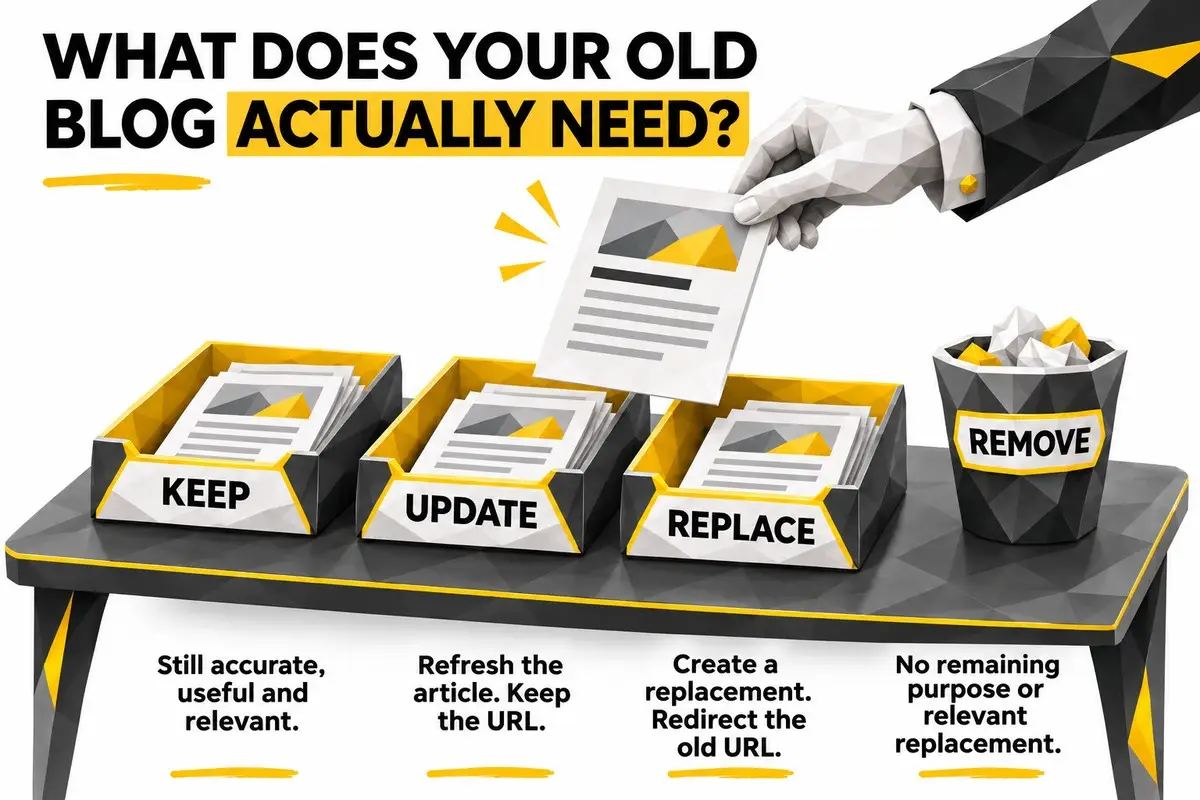
Once you understand its content, visibility and purpose, there are three main options.
Keep It
If it is accurate, useful and relevant, it may be fine as it stands.
You do not need to manufacture changes because the publication date looks old. Make sure people can find it where it would help them.
Update It and Keep the URL
This is usually our preferred starting point where an article still serves its purpose.
Refresh the elements that need attention. That might mean replacing an image, improving the introduction, correcting service details, adding a useful explanation or updating links.
Sometimes it involves more extensive rewriting. A rewrite alone does not automatically require a different web address.
Consider what people already find useful about the article, including the questions bringing them to it through search. Retain those answers while making the piece clearer and more current.
Create a Replacement Where the Changes Justify It
Sometimes the original article no longer fits what needs to be covered.
A service may have changed considerably. The subject may need a broader explanation. Perhaps the original title and URL name a location you no longer serve, while the replacement needs to explain your current coverage.
In those circumstances, a new article and URL may make sense.
Add the topic to your content plan, write and publish the replacement, then retire the old article and put a permanent redirect from its URL to the relevant new piece.
A permanent redirect automatically takes anyone following the old address to the replacement article. Google recommends this where a page has moved or has a clear replacement. developers.google.com
Update links on your own website so they point directly to the new article, and check that the redirect works.
The replacement should meet the need that brought someone to the original page. Sending them to an unrelated article or your homepage simply gives them more work to do.
Occasionally, removal is appropriate. If a post has no current usefulness, historical purpose or relevant replacement, there is no need to create another piece simply to justify retiring it.
Make It Part of Your Content Management Strategy
Looking after existing articles should be part of your content management strategy, alongside creating new ones.
That doesn’t mean reviewing every historic blog in one sitting. Schedule time to review one article a week. Start with an article that still attracts visitors, supports an important service or answers a question your customers regularly ask.
Read it, check what it is doing and decide what needs to happen. Make the straightforward changes there and then where practical. If it needs more substantial work, put that work into your content plan.
A regular slot makes the task manageable and gives you a way to keep useful information current.
For important search terms, Semrush’s Position Tracking lets you monitor selected keywords over time. Use it to follow rankings after updating, alongside checking visits and enquiries. A change in position needs context; it doesn’t automatically prove the edit caused it. www.semrush.com
Put Useful Articles Back to Work
Once an article is ready, think about where it could help.
Link to it from a relevant service page. Include it in a customer reply. Share it through social media or an email campaign when the subject is relevant.
How to Turn One Blog Article into a Mini Content Hub shows how to connect an older article with guides, case stories and service information that help readers explore the subject.
Your newest customers may never have seen something you published years ago.
For ideas on adapting useful material for different channels, see Content Repurposing: How to Get More Value Out of Your Content.
For a worked example, How to Turn One Blog Post into an Email and Three Useful Social Posts shows how to turn an article you are happy to share into four useful messages.
If you want to review your whole archive, The Content Audit: How to Find Hidden Gems in Your Blog Archive explains how to organise that broader exercise.
The Last Word
You have already invested time, knowledge and money in creating your content. Before throwing it away, establish whether it still has something useful to contribute.
Sometimes an older blog needs replacing. Sometimes it deserves to remain exactly where it is. And sometimes a new image and a handful of words are enough to make it something you are happy to share again.
Be honest about what bothers you. Decide what needs changing and make it happen.
Make your content work for you. An older publication date alone is no reason to discard a potentially valuable asset.
The Last Hurdle is a marketing agency based in Silverstone, South Northamptonshire. We work with small and medium-sized businesses in Northampton, Towcester, Milton Keynes, Oxford and throughout the UK.
If you would like help reviewing your existing blogs, identifying useful content and deciding what to refresh or replace, get in touch.
Call 01604 654545 or email hello@thelasthurdle.co.uk.
Part of the Content Writing Hub
This article is part of The Last Hurdle’s Content Writing Hub, bringing together practical guidance on choosing what to write, explaining your business clearly and making more of your existing content.
Explore related guides and real client stories to help you answer customer questions and make their next step clearer.